
Forming a party
A party is a small group of up to 12 players for leveling and adventuring together. You need Basic Skill at level 7 to create one and level 5 to join. The creator becomes the leader and can invite players even when they are far away. Parties make hard bosses and dungeons easier, and support classes such as the Acolyte often level mainly through party play, since they struggle to hunt alone.
| Action | Command or key |
|---|---|
| Create a party | /organize "name" |
| Invite a player (leader) | /invite "name" |
| Leave the party | /leave |
| Open the party window | Alt+Z |
| Post a party listing | /recruit |
| Search listings | /booking |
| Open the friends list | Alt+H |
The same actions are also buttons in the party window. To make someone else leader, open the party window, unlock it with the padlock button if needed, right-click that player and pick the delegation option. The padlock also controls whether you can target party members by name with skills without a private chat window opening; each player sets this for themselves.
Finding a party
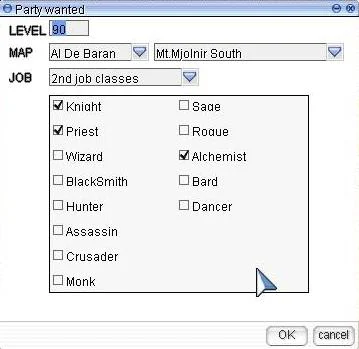
- To recruit: open the listing window, pick the level, leveling area, roles and up to 6 wanted classes, then confirm. A searching window stays open where you can edit the listing, and you cancel it once the party is full.
- To join: press the Booking button under the character info box, set what you look for and search; then contact the player who posted the listing.
Friends list
The friends list tells you when friends log in and out and makes it quick to message them or invite them to a party. It is stored on the server, so it follows you to any computer. Each character holds up to 40 friends. The iRO wiki counts 15 characters per account, for up to 600 friends; the older Classic page counted 9 characters and 360 friends. When friends become a regular group, a guild is the next step.
Sources
- iRO Wiki: Party
- iRO Wiki: Grouping
- iRO Wiki Classic: Grouping
- Ragnarok Online official game guide: Distributing Experience
Game pictures: © Gravity Co., Ltd. · playragnarok.com