29 Oct 2026
Sending a message
Choose who or which channel you want to reach, type your message in the chat bar and press Enter.
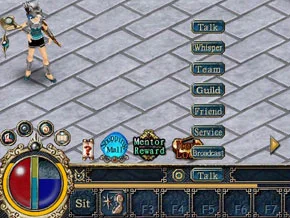
There are four ways to pick the player you talk to:
- Type their name in the box.
- Hold Shift and left-click them.
- Hold Alt and click one of their messages.
- Pick their name from your chat list, if they are on it.
Chat channels
| Channel | Who reads it |
|---|---|
| Talk | Players near you |
| Whisper | Only the player you picked |
| Guild | Your guild members |
| Clan | Your clan members |
| Friend | Only your friends |
| Team | Only your teammates |
| Service | GMs and your friends |
| Broadcast | Every player on the server |
| World | Every player on the server |
Chat list and settings
- Add someone: hold Shift, click the player, then click the add button to put them on your chat list.
- Remove someone: select their name in the list and click the remove button.
- Clear wipes the messages from your screen.
- The Chat button opens the chat log and the settings for channels, filters, text colour and your blacklist.
Sources
Game pictures: © TQ Digital / NetDragon · co.99.com