29 Oct 2026
What it is
A warehouse is your personal storage. You find one in every city, and it is the safe place to keep silver and the valuable things you pick up while hunting, so your bag stays free for new loot.
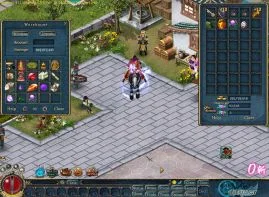
Using the warehouse
| Action | How |
|---|---|
| Store silver | Type the amount at the top of the window and click Deposit. |
| Take silver out | Type the amount and click Withdraw. |
| Store an item | Drag it from your bag into a free storage space. |
| Take an item back | Click it to move it back into your bag. |
One warehouse per city
The warehouses are not linked. An item you leave in one city can only be taken out of that same city's warehouse. Silver is different: what you deposit can be withdrawn from any warehouse.
Secondary password
A hoard in the warehouse can still attract thieves, so the game lets you add a second password. Open Setting, then Secondary, to create it.
- It uses numbers only and can be up to nine digits long.
- Once set, it is asked for actions that involve CPs, and also when you open your warehouse.
- Forgot it? Click the forget option and it is reset after a 7-day wait; the official support site can also help.
Sources
Game pictures: © TQ Digital / NetDragon · co.99.com