
Forming a party
Playing in a party makes hunting faster and safer. The official guide gives a simple way to invite someone:
| Step | What to do |
|---|---|
| 1 | Press D to open the command window. |
| 2 | Click the Party button. |
| 3 | Left-click the character you want in your party. |
| 4 | Read the confirmation message. |
An older fan guide lists the matching shortcuts: point at a player and type /party to invite them, press P for the party window, and start a chat line with ~ to talk only to your party (party chat shows in blue). /request off blocks incoming party, trade and other requests, and /request on allows them again.
Multi-client
The official guide also allows multi-client play: you can run several game clients on one computer at the same time and build a party on your own instead of looking for partners. Log in to each client with a different account. Running many clients at once needs a strong PC.
The Matching system
Since Season 8Season 8 brought a party and guild matching system, so players no longer need chat macros to find a group. Open it with the N key, or pick Matching from the Community menu, then choose Party or Guild matching. There is no level limit, but characters marked as murderers cannot use it.
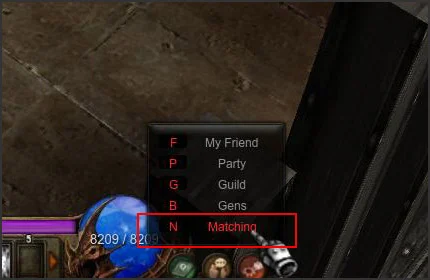
To recruit, fill in the 'Find Party Members' form:
| Field | What it does |
|---|---|
| Title | Required, up to 20 characters |
| Password | Four digits, makes the party closed |
| Auto Accept | Applicants join at once, without waiting |
| Member level | Set in steps of 10 levels |
| Hunting ground | Shown in the post |
| Class | The classes you want |
Players who want to join use 'Search Party'. 'Random Party Matching' finds a fitting party automatically; you can also search post titles by word, view open parties that suit you, check your pending requests and refresh the list. When someone applies to your post, an alert icon flashes (with a sound the first time) and clicking it opens the accept menu.
Limits and cancelling
- Your post or request disappears when your character disconnects.
- It is also removed automatically if your character becomes a murderer while it is up.
- You can stop recruiting at any time with 'Suspend Party Member Search'.
- Guild Matching posts are deleted during the last scheduled maintenance of every month. More on guild recruiting in Guilds & Alliances.
The Season 8 guide also lists places where matching is limited (Yes = allowed, No = not allowed):
| Place | Party | Guild |
|---|---|---|
| Lorencia Market | No | No |
| Loren Valley | No | Yes |
| Arca War | No | Yes |
| Vulcanus | No | No |
| Illusion Temple | No | Yes |
| Chaos Castle | No | No |
| Empire Guardian | No | No |
Sources
- MU Online Guide: Party & Multiclient
- MU Online Guide: Matching System
- MU Online Guide: Season 20-1
- MU Online Wiki (Fandom): Gameplay
- WEBZEN: MU Online to release Season 8 Update
Game pictures: © Webzen Inc. · muonline.webzen.com