8 Nov 2026
Trading with other players
For a direct swap, point at another player and use /trade to open a trade window (an older fan guide lists the command). For selling to many people, the game offers Market channels made for easy trading, where players set up personal shops. In-game money is Zen.
Personal shops
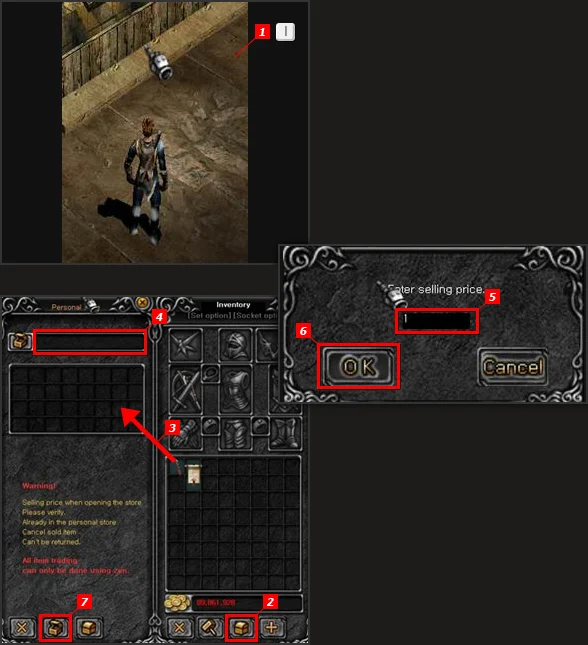
Buying is simple: click a seller, press 'Buy' on the item you want and pay with Zen. To sell, open your own shop:
| Step | What to do |
|---|---|
| 1 | Open your inventory. |
| 2 | Click the personal shop button. |
| 3 | Drag the items you want to sell into the shop. |
| 4 | Give the shop a title. |
| 5 | Enter a price for each item. |
| 6 | Confirm with OK. |
| 7 | Open the shop. |
Searching private stores
Since Season 8 Part 2The Season 8 Part 2 update of July 2013 added a 'Search Private Store' function, so you no longer have to walk past every stall. Later UI changes describe how it works:
- Search items in private stores from the safe zone of any town, with the P key or from the menu under U.
- Sellers can set prices not only in Zen but also as a number of Jewels.
- A 'Private Store Bulletin Board' in Loren Market, at (138,142) and (110,134), also lists the open stores.
Buying back from NPCs
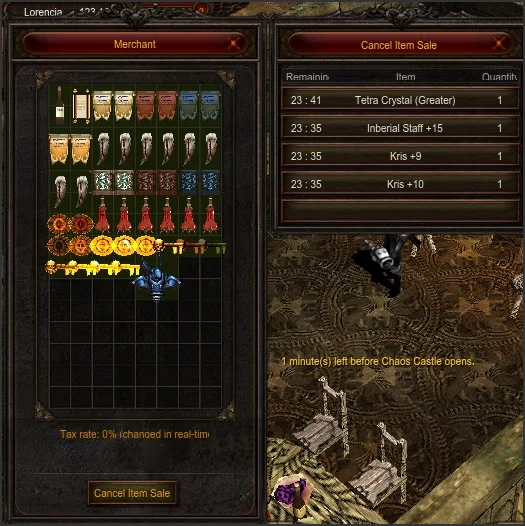
Sold something valuable to an NPC shop by mistake? You can buy it back, with these rules:
| Rule | Detail |
|---|---|
| Which items | Only 'expensive items', the ones that show a warning when you sell them |
| Time limit | Within 24 hours of the sale |
| Fee | 10% of the item's price |
| How many | Your last 5 sold items |
| Not allowed | Time-limited items |
Sources
- MU Online Guide: Skill & Trade
- MU Online Guide: UI Change
- MU Online Guide: Buying Back and More
- MU Online Wiki (Fandom): Gameplay
- WEBZEN: WEBZEN Announces Season 8.2 Update for MU ONLINE
Game pictures: © Webzen Inc. · muonline.webzen.com