
8 Nov 2026
Setting up MU Helper
MU Helper lets your character hunt on its own: it attacks with the skills you choose, drinks potions and picks up the items you want. The official guide sets it up in a few steps:
| Step | What to do |
|---|---|
| 1 | Press the Official MU Helper Setting button. |
| 2 | Type the names of items you want and add them to the auto pick-up list. |
| 3 | Set the HP level at which a potion is used automatically. |
| 4 | Choose the skills and skill combos to use automatically. |
| 5 | Press Save Setting, then press Start. |
How the Hunting Log works
- The log only records hunting done with MU Helper; normal manual hunting is not counted.
- It saves one entry per day and keeps up to 60 days. When a new day is added on top of 60, the oldest day is removed.
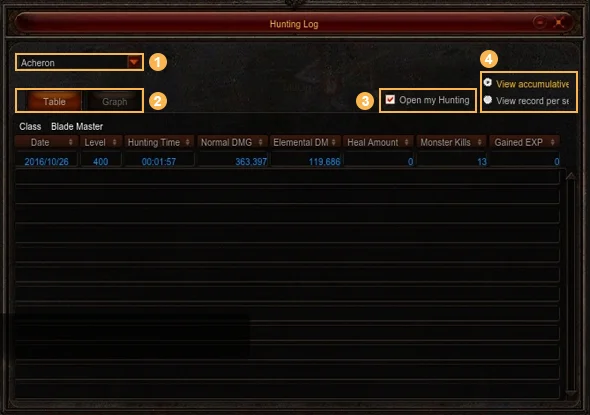
- Open it with the Hunting Log icon at the top left of the screen or with the End key. Pick a field from the menu to see that field's log.
- Switch between a table and a line graph, and between accumulated totals and per-second values. In the table, today's row is shown in blue at the top and updates live; click a column name to sort it.
Minimized window and sharing
- You can shrink the log to a small window with its Minimize button, by clicking the icon again or by pressing End while it is open. The Maximize button brings back the full window.
- The small window shows the Instant Hunting Log: only what happened from the moment MU Helper started until it stopped. It resets the next time you start MU Helper.
- Tick Open My Hunting Log to Public to let others see your log. To look at someone else's, hold Alt, right-click their character and choose View Hunting Log; the option is greyed out if they keep it private.
Fields with a Hunting Log
| Group | Fields |
|---|---|
| Towns and early maps | Lorencia, Noria, Elbeland, Devias, Dungeon, Atlans, Lost Tower, Tarkan |
| Middle maps | Aida, Icarus, Kanturu Ruins, Kanturu Remains, Karutan, La Cleon, Swamp of Peace, Vulcanus |
| Crywolf area and Kalima | Land of Trials, Crywolf, Balgass' Barracks, Kalima 1–7 |
| Later maps | Ubaid, Alkmar, Debenter, Mt. Uruk, Nars, Ferea |
This is the list from the official guide when the log was added. For where to hunt at each level, see the Leveling Guide; maps such as Kalima and Ferea have their own pages, and the keys of the game are in Controls & Chat.
Sources
Game pictures: © Webzen Inc. · muonline.webzen.com