
29 Oct 2026
Making friends
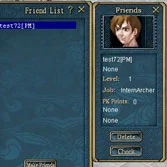
Friendship in Conquer Online works both ways. Open the Friend window, press Make Friends and then click the character you want to add. Once that player does the same with you, the friendship is made and each of you appears in the other's friend list.
- White names in the list are online; red names are offline.
- Click a name to get two options: Check shows that friend's status, and Delete removes them from your list.
Offline messages
You can write to a friend even when they are not playing. Double-click their name in the friend list, type your text and press Send. The message waits for them and is delivered the next time they log in.
The enemy list
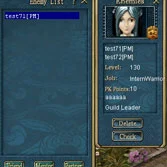
You never add enemies by hand: any player who kills you goes into your enemy list on their own. It is the game's way of reminding you who to watch out for, which is handy in areas where PK is common.
- Like friends, enemies show in white when online and in red when offline.
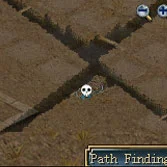
- When an enemy comes close to you, a white skull marks them on the minimap.
- Click an enemy's name to Check their status or Delete them from the list.
Mentors and partners
Sources
Game pictures: © TQ Digital / NetDragon · co.99.com